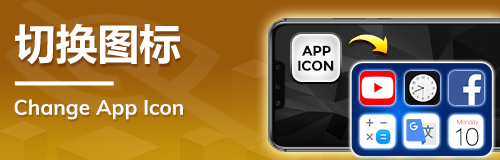

Open the application menu on your device. Locate and click the "APP" section to begin customizing your Star8 icon. This is the starting point for all personalization features under Star8 Sign In.
Inside the app, select the "Me" button. This section allows you to access your account settings and key personalization options available in .
Tap the "Setting" option to open all available customization tools. provides a user-friendly setting panel where icon adjustments can be made easily.
In the settings menu, choose "App Icon". This feature allows you to switch to different icons without affecting your access or functionality.
Select the app icon you want to use. offers multiple icon styles so you can personalize your app appearance according to your preference.
After selecting the icon, tap "Confirm" to finalize your choice. This applies the new icon to your device home screen instantly.
Once confirmed, your new Star8 app icon will appear on your home screen. The process is fast, simple, and fully supported by the platform.
allows users to control how the app appears on their device. Custom icons help you match your preference and create a cleaner, more personalized interface.
Changing the app icon does not affect performance, login, or account security. ensures a smooth user experience while offering flexible customization options.
For additional features, tutorials, or account settings, visit the Info section available inside the platform. All guides are designed to support a seamless and secure user experience.
Change your app icon today and enjoy a more personalized interface supported by Star8 Sign In. Quick, easy, and fully secure.

作为一家国际领先的在线游戏公司,易赢自豪地拥有世界级的游戏信息专家、热情而经验丰富的客户服务团队,以及专业的营销和先进的技术团队。这种协同努力确保我们的客户,在易赢的引领下,能够在一个安全而愉悦的游戏环境中尽情享受。通过我们专业团队的协同专业知识,我们优先考虑玩家的满意度和安全性。














 CN
 EN
 BM